
Key Takeaways
Start at High effort on the API. Most capability gains already appear at High. Use Medium for routine interactive work, Xhigh only when you have measured a clear gain, and Max almost never for production.
Adaptive thinking is always on and cannot be disabled. Control cost and depth exclusively through the
effortparameter.Add the official “Finishing work” system prompt to stop the model from pausing mid-task and asking “Shall I continue?”.
Give the model ownership of the codebase (“This codebase is yours…”) — it then behaves more like a Tech Lead than a fill-in-the-blank assistant.
Four breaking changes on migration: universal prefix check on thinking blocks, forced tool_choice no longer allowed, computer-use toolset change, and advisor model matching. Keep history append-only.
Part 1 covered positioning, benchmarks, and the headline pre-release cases. This part is the operational manual: how to choose effort levels, which system prompts actually change behavior, and the migration details that will 400 your requests if ignored.
1. Effort Levels: The Only Real Control Knob
On Claude Fable 5.2, adaptive thinking is always on. You cannot turn it off. The effort parameter is therefore your primary lever for intelligence, latency, and cost.
Official guidance from Anthropic’s effort documentation and the Fable 5.2 prompting guide:
Level | When to use | Notes |
|---|---|---|
low | Quick back-and-forth, well-specified tasks, high-volume sub-agents | Fastest and cheapest. Scores stay close to older models at higher effort. |
medium | Interactive coding, everyday knowledge work, planning | Default in Claude apps and Claude Code. Good balance for human-in-the-loop sessions. |
high | Hard coding, research, long unattended agentic runs | API default and recommended starting point. Most capability gain is already present here. |
xhigh | Hardest long-running coding & agentic work where you have measured a gain | Uses substantially more tokens. Only step up after evaluating on your own tasks. |
max | Measuring the ceiling, or rare tasks where time and tokens truly do not matter | Optimizes purely for capability. Slow and expensive; small gains over xhigh for most work. |
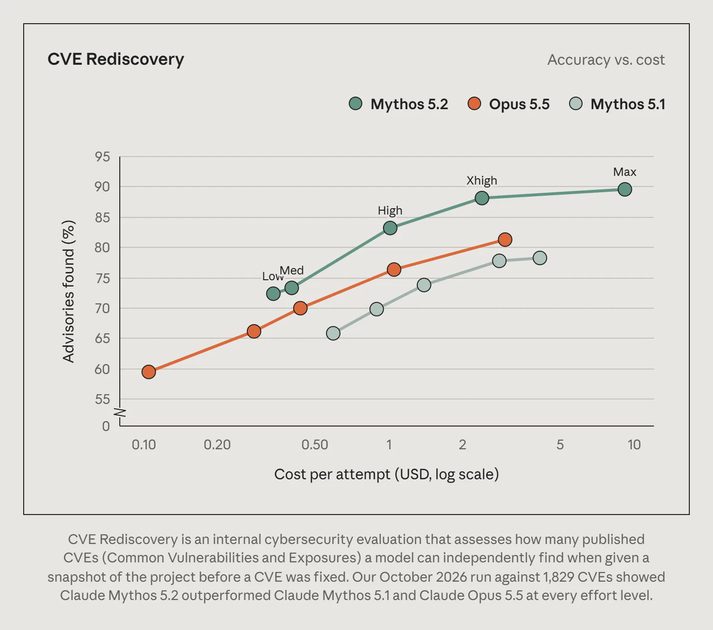
Practical rule of thumb used by many early adopters: plan and architect at Medium, then switch the same conversation (or a fresh agent) to High for implementation and verification. Avoid Max in production loops unless you are deliberately probing limits.
Important: thinking tokens count toward max_tokens and are billed as output. At High and above, set a generous max_tokens (64k+ is common) so the model has room both to think and to answer.
2. The “Finishing Work” System Prompt
One of the most common frustrations with long-horizon agents is mid-task abandonment: the model finishes a step, reports status, and politely asks whether it should continue. Anthropic’s official prompting guide for Fable 5.2 addresses this directly.
Recommended System Prompt Block (from Anthropic docs)
# Finishing work
Please avoid stopping while you still owe work the user asked for. Be persistent and do not stop unless needed. While status notes are welcome, as is clarifying with the user on open decisions, carry on with work that does not depend on the user's answer without unnecessary stops. If you notice yourself inviting the user to redirect you or offering to wait, instead proceed on the next part of the task. You may meet ordinary obstacles like errors, timeouts, locked files, empty results or failing tools. Diagnose them first, and when they are not real blockers, work through them with the access you have (wait and retry, fix the request, use another tool or source) rather than stopping unnecessarily. If someone clearly decided something is a hard blocker, such as a file marked not to be touched, access that was intentionally withheld, or a safety guardrail, leave it alone, say plainly what you found, and look for another safe way to finish the task. Stopping before the task is complete is very rarely merited.
Source: Prompting Claude Fable 5.2 (Anthropic official docs)
This single block dramatically reduces the “Shall I continue?” pattern. Combine it with clear success criteria in the user message (“Done when all tests pass and the PR description is written”) for best results.
3. Give the Model Ownership
Previous generations of models often behaved like careful interns waiting for the next instruction. Fable 5.2 has enough judgment to act as a senior engineer — if you tell it that the codebase is its responsibility.
Ownership Framing (community-validated pattern)
This codebase is yours: what it’s for and how it’s built are your call, and you’ll keep building on it. Prefer clean, maintainable solutions over temporary patches. When you notice historical debt that blocks the current task, fix it as part of the work rather than working around it.
In practice this changes behavior in two useful ways: the model becomes more willing to consolidate duplicated logic, and it stops treating every pre-existing file as sacred. Use it on green-field or owned projects; dial it back on unfamiliar legacy systems where you want more caution.
4. Migration Checklist — Four Things That Will Break
Moving from Fable 5.1, Opus 5.5, or earlier models requires attention. The official Fable 5.2 migration guide lists several breaking changes. The four most important:
4.1 Prefix Check Is Now Universal
Every thinking block produced by Fable 5.2 is bound to the exact system prompt, tools, and message history that preceded it. If your code later edits any of those earlier turns, the API returns a 400 error:
The block is bound to a different conversation
This check now applies to all accounts (on Fable 5.1 it was limited to newer accounts). Keep conversation history append-only. Prefer official compaction or mid-conversation system messages when you need to shorten context. See the preserved thinking documentation.
4.2 Forced tool_choice Is Rejected
tool_choice: {"type": "any"} or {"type": "tool", "name": "..."} returns 400. Use auto + clear instructions, or strict tool use / structured outputs where available.
4.3 Computer Use Toolset Change
Replace the older computer_20251124 tool with the computer_toolset_20260801 toolset. The old form is rejected on most platforms.
4.4 Advisor Model Matching
If you use the advisor tool, a Fable 5.2 executor requires a Fable 5.2 or Mythos 5.2 advisor. Mismatched advisors also 400.
Quick migration order recommended by Anthropic:
1. Update model ID and remove any thinking: {type: "disabled"}.
2. Fix history mutation so the prefix check never fires.
3. Replace forced tool_choice and the old computer-use tool.
4. Re-run your evals at High effort (then test Medium and Xhigh on the tasks that matter).
5. Recommended Working Patterns
Pattern A — Human-in-the-loop feature work
Start at Medium. Ask the model to interview you on missing requirements.
Implement the core path at Medium or High.
Switch to High for edge-case hardening and final verification.
Pattern B — Unattended multi-hour / multi-day agents
System prompt includes the Finishing Work block + ownership framing.
Effort = High (or Xhigh after you have measured the gain).
Clear, machine-checkable success criteria in the user message.
History kept strictly append-only; use official compaction if needed.
Pattern C — Cost-conscious production loops
Default most traffic to Opus 5.5.
Route only the hard, open-ended, or long-horizon tasks to Fable 5.2 at High.
Never leave Max as a permanent setting.
6. Final Checklist Before You Ship
Effort explicitly set (do not rely on silent defaults across different surfaces).
“Finishing work” system prompt present for any unattended agent.
Ownership language present when the model should treat the repo as its own.
No forced tool_choice; computer-use toolset updated.
Conversation history is append-only (or uses official compaction / context editing).
max_tokens large enough for thinking + final answer at High and above.
Your own eval suite re-run at High, Medium, and (selectively) Xhigh.
Fable 5.2 rewards deliberate control. Treat effort as a first-class configuration, keep history clean, and give the model clear ownership and finish-line criteria. When those three things are in place, the model stops feeling like a chat interface and starts feeling like a senior engineer who can actually stay on a problem for hours.
This is Part 2 of the Fable 5.2 Practical Handbook. Part 1 covered positioning, benchmarks, and the major pre-release demonstrations.
Primary sources:
Effort parameter docs · Prompting Claude Fable 5.2 · Migration guide · Preserved thinking · Official announcement
For AI tool features, rules and availability, refer to their official sites.



Leave your thoughts here, too.